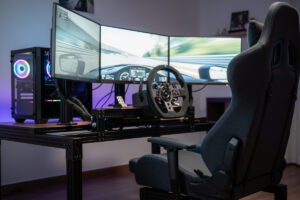
The right GPU for sim racing is the one that holds your monitor’s refresh rate at your exact resolution — nothing more. A single 1440p screen at 120Hz wants a solid mid-range card; triple 1440p roughly triples the pixel load and needs a high-end card to keep the 1% lows above refresh; VR sits higher still because of per-eye rendering and supersampling. Buy to the display, not to a benchmark chart, and you’ll spend half what the forums tell you to.
I’ve fed every display class on my own rig off the same sim — single ultrawide, triple 1440p, and a VR headset — and watched the GPU load change completely while nothing else did. That’s the whole lesson: the card you need is a function of pixels, not of which sim you race. This guide is how to size it. For the current model recommendations there’s a separate best-GPU roundup; this one is about matching a tier to your screen so you don’t overspend or underbuy.
Pixel Count Is the Whole Equation
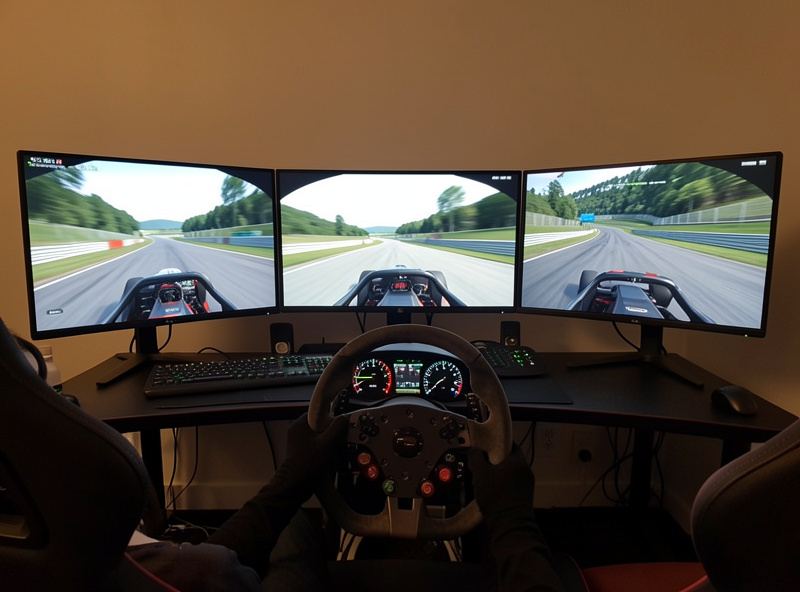
GPU load in sim racing is basically pixels multiplied by frame rate multiplied by graphics quality. A single 1440p panel is about 3.7 million pixels; triple 1440p is roughly 11 million; 4K is 8.3 million; and a VR headset’s per-eye render with supersampling often pushes past 12 million effective pixels. Same sim, same settings — the GPU has to draw three times as much for triples as for a single screen, every single frame.
That’s why “what GPU do I need” has no answer until you’ve decided the display. The card that pins a single 1440p screen at 144 fps will dip into stutter the moment you wrap it across three panels. Decide the screen first, work out the pixel count, then size the card to hold refresh with margin in the 1% lows — the dips, not the average, are what you feel in a braking zone.
GPU Tier by Display Setup
Here’s the mapping I use. Treat the tiers as “enough to hold refresh at sensible sim settings,” not “max everything in a benchmark.” Sim titles are well optimised, so you rarely need the absolute flagship unless you’re on triples or chasing high-refresh VR.
| Display | Pixel load | GPU tier | Why |
|---|---|---|---|
| Single 1080p 144Hz | Low | Entry mid-range | Easy to pin 144 fps; spend the savings on pedals |
| Single 1440p 144Hz | Moderate | Solid mid-range | Holds 100–144 fps in iRacing/ACC at good settings |
| Single 4K / 32:9 ultrawide | High | Upper mid-range | More pixels than 1440p; needs more headroom |
| Triple 1440p | Very high | High-end | ~3x the pixels; only top cards hold the 1% lows |
| VR (Quest 3 / Reverb class) | Very high | High-end | Per-eye render + supersampling is brutal on GPUs |
The pattern is steep: every step toward more pixels jumps the GPU requirement, while the CPU barely moves. If your budget is fixed, that means your display ambition is really a GPU-budget decision in disguise. A racer who’ll be happy on a single 1440p screen for years can buy a far cheaper card than one who’s headed for triples.
VRAM and the Triple-Monitor Trap
VRAM is the spec that quietly bites triple-monitor and VR users. Frame buffers scale with resolution, and ACC’s high-res textures across three 1440p panels can push past what an 8GB card holds comfortably, forcing it to spill into system RAM — which shows up as ugly stutter rather than a clean lower frame rate. For triples or VR, I’d treat 12GB as the floor and 16GB as comfortable headroom.
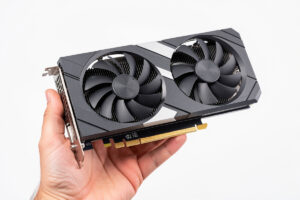
On a single screen this rarely matters; 8GB is fine at 1440p in current sims. It’s specifically the wide and VR setups where VRAM, not raw shading power, becomes the thing that ruins smoothness. If you’re buying a card you intend to grow into a triple setup, don’t cheap out on memory — a card with strong shading but thin VRAM ages badly for sim racers. A solid 16GB graphics card is the safer long-term buy for anyone eyeing triples.
As an Amazon Associate I earn from qualifying purchases.
Settings Move the Needle More Than People Admit
Before you buy a tier up, know that sim graphics settings have enormous headroom. Shadows, reflections, and crowd/track detail are the heavy hitters, and dialling them from Ultra to High often costs nothing visible at racing speed while buying back 20–30% of your frames. I’ve kept a “borderline” card perfectly smooth on triples just by being disciplined about reflections, which the human eye barely registers when you’re focused on an apex.
So the honest buying advice is: size the GPU for High-ish settings at your resolution, not maxed-out Ultra. You’ll save real money, and the visual difference at 150 mph is negligible. The frames you keep go into 1% lows, which is where smoothness actually lives. A capable mid-range GPU tuned this way outperforms an over-bought card running maxed settings it can’t quite hold.
Where the Saved Money Should Go
If you’re on a single 1440p screen, a flagship GPU is wasted — you’re already pinned at refresh, and the extra horsepower draws power and makes heat for frames you can’t use. That money does far more for your lap time in pedals, where a load-cell brake transforms your braking consistency, or in rig rigidity. The card only needs to be “enough,” and on a single screen “enough” is genuinely mid-range.
This is the trap the FPS-benchmark crowd falls into when they cross over to sim racing: they buy the biggest card for a single screen and wonder why it doesn’t feel transformative. It can’t — the bottleneck was never the GPU at that resolution. Match the card to the display, pocket the difference, and put it where you can actually feel it. The whole-rig view is laid out in the sim racing PC build guide, which sets the GPU in context with everything else in the box.
Buying for an Upgrade Path
If you know triples or VR are coming, buy that GPU now rather than upgrading twice — selling a mid-range card and rebuying high-end loses you money to depreciation and hassle. But only do this if the plan is real; “might go triples someday” is not a reason to spend triple-monitor money on a single-screen build that may stay single for years. Be honest about your trajectory and buy for where you’ll actually be in a year.
And remember the GPU lives in a system. Feeding a strong card needs a CPU that won’t bottleneck it in big grids, enough RAM, and a PSU sized for the draw. A hero GPU starved by the rest of the box is the most common lopsided build there is — the card can only deliver what the system around it allows.
Frequently Asked Questions
What GPU do I need for single-monitor sim racing?
A solid mid-range card. At 1440p 144Hz it holds 100 to 144 fps in iRacing and ACC at good settings. A flagship is wasted on one screen because you are already pinned at refresh — put the saved money into pedals instead.
What GPU do I need for triple monitors?
A high-end card. Triple 1440p is roughly 11 million pixels, about three times a single 1440p screen, so only top-tier GPUs keep the 1% lows above refresh. Aim for 12 to 16GB of VRAM to avoid texture stutter at that width.
How much VRAM do I need for sim racing?
8GB is fine for a single 1440p screen. For triples or VR, treat 12GB as the floor and 16GB as comfortable, because frame buffers scale with resolution and high-res textures across three panels can overflow an 8GB card into stutter.
Is the GPU more important than the CPU for sim racing?
Usually yes. Adding screens is a GPU problem, not a CPU problem. The CPU only becomes the limiter in large multiplayer fields where physics for 30-plus cars must be calculated each tick. For pure frame-holding, the GPU does the heavy lifting.
Can I lower settings instead of buying a bigger GPU?
Often, yes. Shadows, reflections, and track detail are the heavy hitters. Dropping them from Ultra to High can buy back 20 to 30 percent of your frames with almost no visible difference at racing speed, keeping a borderline card smooth.